EVPN Multihoming Across Vendors, Part 2: Verifying the Forwarding Plane
The control plane agrees on the Designated Forwarder and the host still receives every broadcast twice. Multi-point captures, a same-vendor control group, and a packet capture that was quietly lying.
on this page
Part 1 finished the underlay, the EVPN overlay, the host bond and the cross-vendor ESI configuration. Five vendor differences were hit along the way and four were aligned: the ESI type unified on Type 0, and the LACP system priority, oper key and system MAC each brought into line. The four leaves now recognise the same Ethernet Segment, the Type-4 routes are complete, and Number of ports: 4.
The fifth difference left over is the DF election algorithm: Cumulus uses Preference-Based DF Election (algorithm number 2, framework in RFC 8584, the algorithm itself defined by RFC 9785), while Arista uses the default algorithm defined by RFC 7432 (called service-carving in FRR output and modulus in EOS output — the same thing). The two vendors report different DF results, and every show output is green.
This article continues the verification. The focus is no longer on what the devices say, but on where the packets actually go: first get the capture points right, then verify DF election, fast withdrawal, split horizon and aliasing one by one.
About the lab environment
Everything described here comes from a PNetLab virtual environment involving Cumulus VX 5.9.1, Arista vEOS-lab 4.32.4M and Nexus 9000v 10.5(2). The forwarding behaviour conclusions are specific to that combination and are not directly equivalent to the behaviour of real switching silicon or other software versions — see the “Boundaries” section at the end.
Data plane verification#
Capturing all four links from the host machine#
Capturing PNetLab links with Wireshark earlier had a problem: with four windows open there was no way to tell which corresponded to which host NIC. You could only guess from the topology diagram, and the diagram and the actual cabling are not necessarily the same. Capturing inside the container directly was not an option either, because tcpdump could not be installed — the management subnet PNetLab gives Docker nodes (10.177.0.0/16 here) has no route to the internet, so apt does not work.
The way around it is to capture on the host machine, but first the mapping between container NICs and host interfaces has to be established. Start by finding the container:
root@pnetlab:~# docker ps
CONTAINER ID        IMAGE                      COMMAND                 CREATED             STATUS              PORTS                                        NAMES
b4bc6f383934        pnetlab/ubuntu_sv:latest   "/home/start.sh bash"   2 days ago          Up 26 hours         22-23/tcp, 80/tcp, 0.0.0.0:40017->3389/tcp   docker17
f796d38784a3        pnetlab/ubuntu_sv:latest   "/home/start.sh bash"   3 days ago          Up 3 days           22-23/tcp, 80/tcp, 0.0.0.0:40009->3389/tcp   docker9
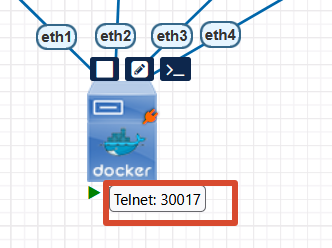
Hovering over the Docker node in the web UI gives the device port, as shown below. Mine is 30017, which identifies container ID b4bc6f383934.
Use it to translate into interface names:
root@pnetlab:~# C=b4bc6f383934
root@pnetlab:~# for i in 1 2 3 4; do
>   idx=$(docker exec $C cat /sys/class/net/eth$i/iflink 2>/dev/null)
>   name=$(ip -o link | awk -F': ' -v n="$idx" '$1+0==n {print $2}' | cut -d@ -f1)
>   echo "eth$i -> ifindex $idx -> $name"
> done
eth1 -> ifindex 385 -> vunl17_1
eth2 -> ifindex 387 -> vunl17_2
eth3 -> ifindex 389 -> vunl17_3
eth4 -> ifindex 391 -> vunl17_4
PNetLab’s naming convention is vunl<node number>_<interface number>, so docker17 maps to vunl17_* — very tidy. Once you know the rule you can match them at a glance, but running it once to confirm beats guessing. Then capture on all four at once, prefixing with sed so they stay distinguishable even mixed into one terminal:
for i in 1 2 3 4; do
  tcpdump -i vunl17_$i -n -e arp -l 2>/dev/null | sed "s/^/[eth$i] /" &
done
sleep 1; jobs
-l is line buffering; without it the output accumulates in batches before being emitted, which looks like nothing is being captured. kill %1 %2 %3 %4 cleans up afterwards.
Traffic is generated by pinging an address that does not exist in the subnet, from the VPC side:
ping 192.168.100.99
The target does not exist, so the VPC keeps sending ARP broadcasts — and broadcasts must be forwarded to the host by the DF, which is exactly the path we want to observe.
One final point: do not capture inside the host container. Cumulus has arp-nd-suppress on, so a lot of ARP is answered locally by the leaf and never enters the flooding path at all; what you see inside the container will be distorted. To see the real forwarding behaviour of BUM, you have to capture on the links. All the BUM tests below follow this premise and I will not repeat it.
Letting forwarding behaviour settle it#
show cannot tell us, so look at the actual traffic. The DF’s job is to deliver BUM traffic arriving from the fabric side to the access device, so all it takes is generating traffic that must be flooded and then counting how many copies the host receives — that tells you how many devices are forwarding.
The capture result is below: both Leaf03 and Leaf04 flooded.
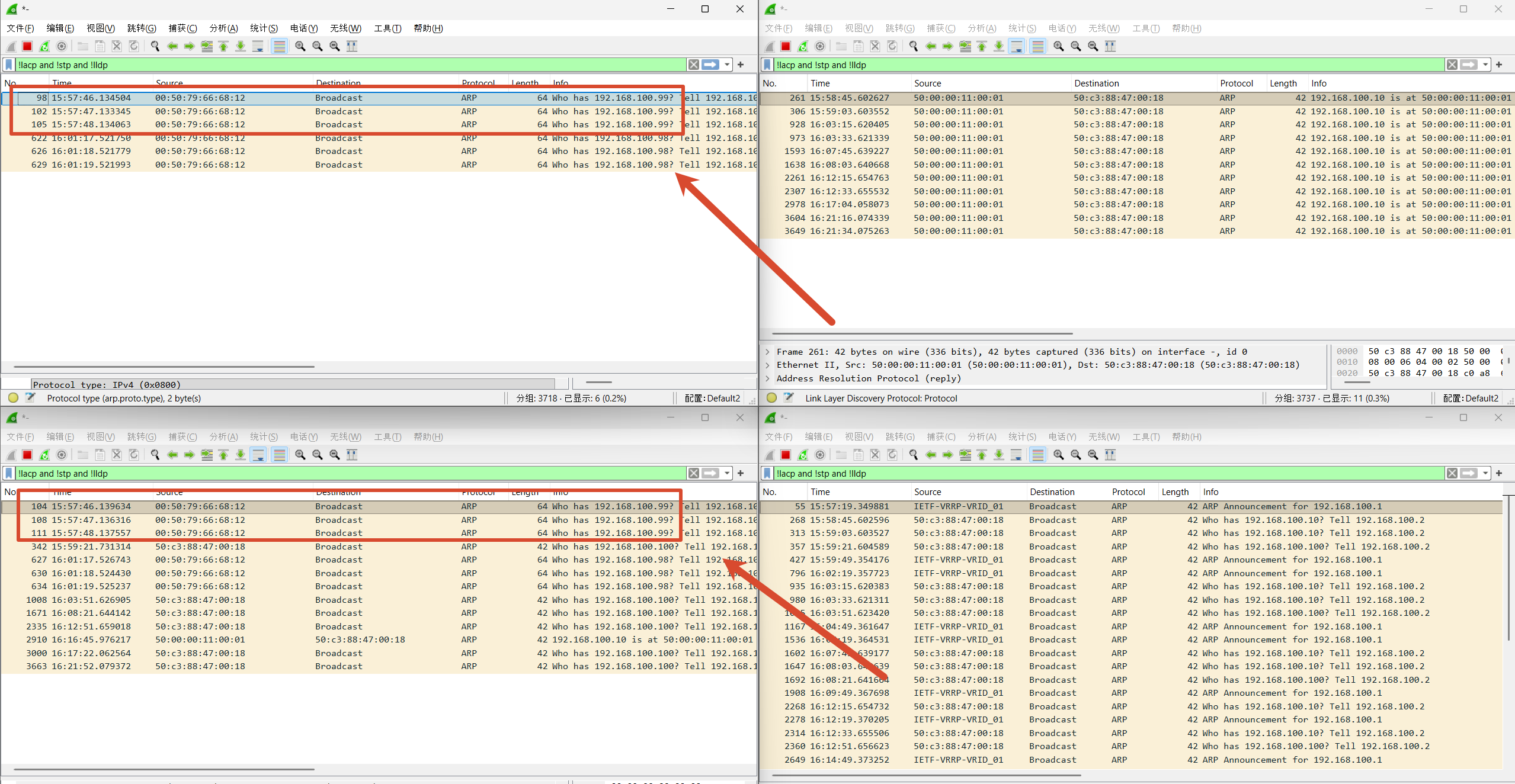
Lining up the timestamps:
| ARP request | Link one | Link two | Delta |
|---|---|---|---|
| Who has 192.168.100.99 | 15:57:46.134504 | 15:57:46.139634 | 5.1 ms |
| Who has 192.168.100.99 | 15:57:47.133345 | 15:57:47.136316 | 3.0 ms |
| Who has 192.168.100.99 | 15:57:48.134063 | 15:57:48.137557 | 3.5 ms |
| Who has 192.168.100.98 | 16:01:17.521750 | 16:01:17.526743 | 5.0 ms |
| Who has 192.168.100.98 | 16:01:18.521779 | 16:01:18.524430 | 2.7 ms |
| Who has 192.168.100.98 | 16:01:19.521993 | 16:01:19.525237 | 3.2 ms |
The source MAC is 00:50:79:66:68:12 in every case, the target IP is the same, the frame length is 64 throughout, and the time difference is only a few milliseconds. These are not two independent requests — they are two copies of the same broadcast. In other words, two devices are forwarding BUM traffic to the host simultaneously. And the entire point of DF election is to guarantee that only one device does that for a given segment and VLAN. RFC 8584’s compatibility handling is that when members’ algorithms are inconsistent, all of them fall back to the RFC 7432 default. Judging by the forwarding result, this cross-vendor combination has not converged on a state where only one device forwards.
The four differences already resolved in part 1 were all explicit. ESI type mismatch produced an outright error when typed; LACP parameters not matching left Number of ports visibly wrong, and following the trail always led to a fix.
The DF one is completely different:
- BGP neighbours all Established
- ES state up, all four mutually visible, Type-4 routes complete
Number of ports: 4, LACP entirely fine- Ping works, and the service looks completely normal
Everything you can look at is green, and only capturing real BUM traffic exposes it. And duplicate delivery is a slow poison: upper-layer applications receive broadcasts twice, MAC learning flaps, and in multicast scenarios the traffic simply doubles. None of that presents as an immediate outage — it turns into intermittent, hard-to-locate weirdness. Since the root cause is the two vendors’ algorithms being inconsistent, unifying them ought to fix it. Let me see whether Arista can be changed to the preference algorithm too.
Changing Arista to preference as well#
EOS supports advertising the algorithm per the RFC 8584 framework and also implements RFC 9785’s preference algorithm. Change both Aristas:
interface Port-Channel9
   evpn ethernet-segment
      designated-forwarder election algorithm preference 100
Preference is set to 100, lower than Cumulus’s 32767, so who should be elected is unambiguous. The control plane aligned immediately:
cumulus@Leaf01:mgmt:~$ sudo vtysh -c "show evpn es detail"
ESI: 00:11:22:33:44:55:66:77:88:99
 DF status: df
 DF preference: 32767
 VTEPs:
     10.255.255.4     df_alg: preference df_pref: 100
     10.255.255.5     df_alg: preference df_pref: 32767
     10.255.255.6     df_alg: preference df_pref: 100
Leaf02#show bgp evpn instance
  Local ethernet segment:
    ESI: 0011:2233:4455:6677:8899
      Mode: all-active
      State: up
      DF election algorithm: preference
      Designated forwarder: 10.255.255.3
      Non-Designated forwarder: 10.255.255.4
      Non-Designated forwarder: 10.255.255.5
      Non-Designated forwarder: 10.255.255.6
All four now show df_alg: preference, and the DF consistently points at 10.255.255.3. The election logic checks out too: Cumulus’s 32767 beats Arista’s 100, and with the two Cumulus boxes tied it comes down to IP, where .3 is lower than .5, so Leaf01 is elected. Leaf03 confirms it is non-df:
cumulus@Leaf03:mgmt:~$ sudo vtysh -c "show evpn es detail"
 DF status: non-df
 DF preference: 32767
The first BUM re-test (this section’s conclusion is wrong)#
Up front: the judgement reached in this section was later overturned, because the capture processes had not all started. It is kept in full because it was precisely an anomalous result later on that revealed the instrumentation itself was at fault — and that process is more worth recording than the conclusion was.
An aligned control plane does not mean the problem is solved, so test again the same way. Four captures on the host machine, ping a nonexistent address from the VPC side:
[eth3-Leaf03] 08:50:29.078315 00:50:79:66:68:12 > ff:ff:ff:ff:ff:ff, Request who-has 192.168.100.99 tell 192.168.100.100
[eth3-Leaf03] 08:50:30.077301 00:50:79:66:68:12 > ff:ff:ff:ff:ff:ff, Request who-has 192.168.100.99 tell 192.168.100.100
[eth3-Leaf03] 08:50:31.077799 00:50:79:66:68:12 > ff:ff:ff:ff:ff:ff, Request who-has 192.168.100.99 tell 192.168.100.100
Seeing only one of the four links receiving it, I judged that duplicate delivery had gone and that unifying the algorithm had worked.
Another anomaly inside the wrong observation#
There was another oddity at the time: the only link receiving the packets was the one attached to Leaf03, while the DF was Leaf01. So I went and captured on both Cumulus boxes simultaneously, to rule out interface mapping as a confounder:
cumulus@Leaf03:mgmt:~$ sudo tcpdump -i bond1 -n -e arp
09:07:21.590837 00:50:79:66:68:12 > ff:ff:ff:ff:ff:ff, Request who-has 192.168.100.98 tell 192.168.100.100
09:07:22.590900 00:50:79:66:68:12 > ff:ff:ff:ff:ff:ff, Request who-has 192.168.100.98 tell 192.168.100.100
09:07:23.591765 00:50:79:66:68:12 > ff:ff:ff:ff:ff:ff, Request who-has 192.168.100.98 tell 192.168.100.100
cumulus@Leaf01:mgmt:~$ sudo tcpdump -i bond1 -n -e arp
listening on bond1, link-type EN10MB (Ethernet), snapshot length 262144 bytes
(no output at all during the same period)
This pair was captured on the devices simultaneously with both processes confirmed running, so the conclusion is trustworthy: the non-DF Leaf03 is forwarding and the DF Leaf01 does not forward a single packet. Duplicate delivery appeared to be gone, but the device doing the forwarding was not the one that had been elected. That anomaly became the clue that later exposed the observation error.
Raising the Arista preference#
The open question now is: does Cumulus simply not decide forwarding based on DF state? Or is this whole mechanism just a mess across vendors? Making an Arista the DF distinguishes the two. Set Leaf02’s preference to 40000 and leave Leaf04 at 100, so the DF lands unambiguously on Leaf02 with the fewest variables:
interface Port-Channel9
   evpn ethernet-segment
      designated-forwarder election algorithm preference 40000
As shown below, Leaf02 duly became the DF:
Leaf02(config-evpn-es)#show bgp evpn instance
EVPN instance: VLAN 10
  Route distinguisher: 10.255.255.4:10
  Route target import: Route-Target-AS:10:10
  Route target export: Route-Target-AS:10:10
  Service interface: VLAN-based
  Local VXLAN IP address: 10.255.255.4
  VXLAN: enabled
  MPLS: disabled
  Local ethernet segment:
    ESI: 0011:2233:4455:6677:8899
      Interface: Port-Channel9
      Mode: all-active
      State: up
      ES-Import RT: 11:22:33:44:55:66
      DF election algorithm: preference
      Designated forwarder: 10.255.255.4
      Non-Designated forwarder: 10.255.255.3
      Non-Designated forwarder: 10.255.255.5
      Non-Designated forwarder: 10.255.255.6
Leaf01 and Leaf03 both see Leaf02 as the DF as well. Leaf01’s output is below; Leaf03’s is the same, so it is not pasted.
cumulus@Leaf01:mgmt:~$ sudo vtysh -c "show evpn es detail"
[sudo] password for cumulus:
ESI: 00:11:22:33:44:55:66:77:88:99
...
 DF status: non-df
 DF preference: 32767
 Nexthop group: 536870915
 VTEPs:
     10.255.255.4     10.255.255.4(local) df_alg: preference df_pref: 40000 sph: tc-filter
 nh: 268435458
     10.255.255.5     10.255.255.5(local) df_alg: preference df_pref: 32767 sph: tc-filter
 nh: 268435460
     10.255.255.6     10.255.255.6(local) df_alg: preference df_pref: 100 sph: tc-filter
 nh: 268435457
Result: two links both receive it#
Four-way capture, ping a nonexistent address from the VPC side:
[eth4] 09:42:23.705711 00:50:79:66:68:12 > ff:ff:ff:ff:ff:ff, Request who-has 192.168.100.99 tell 192.168.100.100
[eth3] 09:42:23.709868 00:50:79:66:68:12 > ff:ff:ff:ff:ff:ff, Request who-has 192.168.100.99 tell 192.168.100.100
[eth4] 09:42:24.705527 00:50:79:66:68:12 > ff:ff:ff:ff:ff:ff, Request who-has 192.168.100.99 tell 192.168.100.100
[eth3] 09:42:24.708486 00:50:79:66:68:12 > ff:ff:ff:ff:ff:ff, Request who-has 192.168.100.99 tell 192.168.100.100
[eth4] 09:42:25.706034 00:50:79:66:68:12 > ff:ff:ff:ff:ff:ff, Request who-has 192.168.100.99 tell 192.168.100.100
[eth3] 09:42:25.709044 00:50:79:66:68:12 > ff:ff:ff:ff:ff:ff, Request who-has 192.168.100.99 tell 192.168.100.100
eth3 and eth4 each receive one copy, three to four milliseconds apart — the second kind of result, with duplicate delivery back again. And the DF is Leaf02, on whose corresponding eth2 not a single packet arrived. But this does not line up with what came before. Earlier the measurement clearly showed only one link receiving; how does changing a preference turn that into two?
Going back to check: the captures had not all started#
root@pnetlab:~# jobs
[2]+  Running    tcpdump -i vunl17_3 -n -e arp -l | sed 's/^/[eth3-Leaf03] /' &
Only one process was running, capturing on vunl17_3. “Only eth3 received it” was because only eth3 was being captured — whether there was traffic on eth4 was never observed at all. Three of the lines had been swallowed when the multi-line command was pasted into the terminal, and tcpdump’s startup messages were mixed into the output so I did not notice at the time. Which means the conclusion that duplicate delivery disappeared after unifying the algorithm does not stand, and it has to be re-tested.
Switching the DF back to Leaf01 and starting over#
First confirm all four are running:
pkill tcpdump
for i in 1 2 3 4; do
  tcpdump -i vunl17_$i -n -e arp -l 2>/dev/null | sed "s/^/[eth$i] /" &
done
sleep 1; jobs
[7] Running tcpdump -i vunl17_$i ... &
[8] Running tcpdump -i vunl17_$i ... &
[9]- Running tcpdump -i vunl17_$i ... &
[10]+ Running tcpdump -i vunl17_$i ... &All four are up. Change Leaf02’s preference back to 100 and the DF returns to Leaf01:
Leaf02#show bgp evpn instance
      DF election algorithm: preference
      Designated forwarder: 10.255.255.3
      Non-Designated forwarder: 10.255.255.4
      Non-Designated forwarder: 10.255.255.5
      Non-Designated forwarder: 10.255.255.6
Test again:
[eth4] 09:46:52.449715 00:50:79:66:68:12 > ff:ff:ff:ff:ff:ff, Request who-has 192.168.100.99 tell 192.168.100.100
[eth3] 09:46:52.453997 00:50:79:66:68:12 > ff:ff:ff:ff:ff:ff, Request who-has 192.168.100.99 tell 192.168.100.100
[eth4] 09:46:53.449907 00:50:79:66:68:12 > ff:ff:ff:ff:ff:ff, Request who-has 192.168.100.99 tell 192.168.100.100
[eth3] 09:46:53.453054 00:50:79:66:68:12 > ff:ff:ff:ff:ff:ff, Request who-has 192.168.100.99 tell 192.168.100.100
[eth4] 09:46:54.450443 00:50:79:66:68:12 > ff:ff:ff:ff:ff:ff, Request who-has 192.168.100.99 tell 192.168.100.100
[eth3] 09:46:54.453455 00:50:79:66:68:12 > ff:ff:ff:ff:ff:ff, Request who-has 192.168.100.99 tell 192.168.100.100
Still eth3 + eth4. Simultaneous captures on the devices agree:
cumulus@Leaf03:mgmt:~$ sudo tcpdump -i bond1 -n -e arp
09:46:51.236687 00:50:79:66:68:12 > ff:ff:ff:ff:ff:ff, Request who-has 192.168.100.99 tell 192.168.100.100
09:46:52.235733 00:50:79:66:68:12 > ff:ff:ff:ff:ff:ff, Request who-has 192.168.100.99 tell 192.168.100.100
09:46:53.236070 00:50:79:66:68:12 > ff:ff:ff:ff:ff:ff, Request who-has 192.168.100.99 tell 192.168.100.100
cumulus@Leaf01:mgmt:~$ sudo tcpdump -i bond1 -n -e arp
09:46:47.958855 50:c3:88:47:00:18 > ff:ff:ff:ff:ff:ff, Request who-has 192.168.100.10 tell 192.168.100.2
09:47:05.959550 50:c3:88:47:00:18 > ff:ff:ff:ff:ff:ff, Request who-has 192.168.100.10 tell 192.168.100.2
09:47:18.563105 00:00:5e:00:01:01 > ff:ff:ff:ff:ff:ff, Request who-has 192.168.100.1 tell 192.168.100.1
Leaf01 only shows frames it originated itself (50:c3:88:47:00:18 is its bridge MAC and 00:00:5e:00:01:01 is the anycast gateway’s virtual MAC) — not a single one from the VPC’s 00:50:79:66:68:12.
Type-1 routes#
Of the four mechanisms described in part 1, aliasing and fast withdrawal are both underpinned by Type-1 EAD routes, so let me look at what they are. On Leaf01:
cumulus@Leaf01:mgmt:~$ sudo vtysh -c "show bgp l2vpn evpn route type ead"
EVPN type-1 prefix: [1]:[EthTag]:[ESI]:[IPlen]:[VTEP-IP]:[Frag-id]

Route Distinguisher: 10.255.255.3:2
*> [1]:[0]:[00:11:22:33:44:55:66:77:88:99]:[128]:[::]:[0] RD 10.255.255.3:2
                    ET:8 RT:10:10
Route Distinguisher: 10.255.255.3:3
*> [1]:[4294967295]:[00:11:22:33:44:55:66:77:88:99]:[128]:[::]:[0] RD 10.255.255.3:3
                    ET:8 ESI-label-Rt:AA RT:10:10
Route Distinguisher: 10.255.255.4:1
*> [1]:[4294967295]:[00:11:22:33:44:55:66:77:88:99]:[32]:[0.0.0.0]:[0] RD 10.255.255.4:1
                    RT:10:10 ET:8 ESI-label-Rt:AA
Route Distinguisher: 10.255.255.4:10
*> [1]:[0]:[00:11:22:33:44:55:66:77:88:99]:[32]:[0.0.0.0]:[0] RD 10.255.255.4:10
                    RT:10:10 ET:8
Route Distinguisher: 10.255.255.5:2
*> [1]:[0]:[00:11:22:33:44:55:66:77:88:99]:[32]:[0.0.0.0]:[0] RD 10.255.255.5:2
                    RT:10:10 ET:8
Route Distinguisher: 10.255.255.5:3
*> [1]:[4294967295]:[00:11:22:33:44:55:66:77:88:99]:[32]:[0.0.0.0]:[0] RD 10.255.255.5:3
                    RT:10:10 ET:8 ESI-label-Rt:AA
Route Distinguisher: 10.255.255.6:1
*> [1]:[4294967295]:[00:11:22:33:44:55:66:77:88:99]:[32]:[0.0.0.0]:[0] RD 10.255.255.6:1
                    RT:10:10 ET:8 ESI-label-Rt:AA
Route Distinguisher: 10.255.255.6:10
*> [1]:[0]:[00:11:22:33:44:55:66:77:88:99]:[32]:[0.0.0.0]:[0] RD 10.255.255.6:10
                    RT:10:10 ET:8
The same ESI appears in two forms, distinguished by the second field in the prefix, the Ethernet Tag:
| Prefix form | Name | Mechanism |
|---|---|---|
[1]:[0]:[ESI] | EAD per-EVI | Aliasing — lets remote devices spread traffic across every member of the segment |
[1]:[4294967295]:[ESI] | EAD per-ES | Fast withdrawal — one message removes an entire device on link failure |
4294967295 is MAX-ET (0xFFFFFFFF); per-ES routes use it as the Ethernet Tag to indicate that the scope is the whole segment rather than one EVI. The form with a specific tag binds to a single EVI — here, under VLAN-based service, that is 0. All four devices advertise both forms, which means all the segment members are ready. Two further details are worth noting.
First, ESI-label-Rt:AA appears only on the per-ES routes. This is the ESI Label extended community defined by RFC 7432, used in the MPLS case to carry the label for split horizon. VXLAN does not use this label (it uses Local Bias instead), but the attribute is carried anyway.
Second, the two vendors assign RDs differently:
| RD for per-EVI | RD for per-ES | |
|---|---|---|
| Cumulus | <loopback>:2 | <loopback>:3 |
| Arista | <loopback>:10 | <loopback>:1 |
Arista’s per-EVI uses :10, which is exactly the EVI’s RD (vlan 10 / rd 10.255.255.4:10 in the configuration); Cumulus allocates its own sequence numbers. This difference does not affect interoperability, because an RD only needs to be globally unique and does not participate in matching. But when troubleshooting, if you map route types by RD suffix, the two vendors follow different patterns and it is easy to misread.
Link failure test#
With duplicate delivery confirmed in steady state, what does failover look like? Take down Leaf03, which is currently forwarding:
cumulus@Leaf03:~$ sudo ip link set bond1 down
The control plane first. Checking the EAD routes on the other leaves, one of Leaf03’s entries is gone:
Route Distinguisher: 10.255.255.5:2
*> [1]:[0]:[00:11:22:33:44:55:66:77:88:99]:[32]:[0.0.0.0]:[0] RD 10.255.255.5:2
                    RT:10:10 ET:8
The per-EVI 10.255.255.5:2 is still there, but the per-ES 10.255.255.5:3 has gone. The count at the end agrees: when the segment was formed there were 8 (two per device for four devices), and now there are 7.
Displayed 7 prefixes (12 paths) (of requested type)This is exactly the fast withdrawal described earlier: the moment the link goes down, a single per-ES route is withdrawn to remove the whole device from the segment, and the per-EVI converges afterwards. One message stands in for withdrawing every MAC behind that device — which is the reason the mechanism exists. Catching this intermediate state is not easy. The ES membership converged along with it, and Leaf03 disappeared from Leaf01’s VTEP list:
cumulus@Leaf01:mgmt:~$ sudo vtysh -c "show evpn es detail"
ESI: 00:11:22:33:44:55:66:77:88:99
 State: up
 DF status: df
 DF preference: 32767
 VTEPs:
     10.255.255.4     df_alg: preference df_pref: 100
     10.255.255.6     df_alg: preference df_pref: 100
The Arista side is the same — three members left, DF still Leaf01:
Leaf02#show bgp evpn instance
  Local ethernet segment:
    ESI: 0011:2233:4455:6677:8899
      State: up
      DF election algorithm: preference
      Designated forwarder: 10.255.255.3
      Non-Designated forwarder: 10.255.255.4
      Non-Designated forwarder: 10.255.255.6
The control plane’s behaviour is textbook: failure detection, fast withdrawal, member convergence, DF assignment — every step correct. Now the data plane. Continue pinging a nonexistent address from the VPC side:
[eth4] 10:35:28.813604 00:50:79:66:68:12 > ff:ff:ff:ff:ff:ff, Request who-has 192.168.100.89 tell 192.168.100.100
[eth4] 10:35:29.813724 00:50:79:66:68:12 > ff:ff:ff:ff:ff:ff, Request who-has 192.168.100.89 tell 192.168.100.100
[eth4] 10:35:30.814740 00:50:79:66:68:12 > ff:ff:ff:ff:ff:ff, Request who-has 192.168.100.89 tell 192.168.100.100
BUM was not interrupted — Leaf04 is still delivering it. From a service point of view, the multihoming redundancy is working: one uplink goes down and traffic carries on.
But the device picking it up is still not the DF. Leaf01 is now both the only elected DF and one of only two devices left in the segment, and eth1 still shows not a single packet.
So what is actually deciding the forwarding#
Putting the four rounds of observation side by side, the pattern emerges:
| DF (control plane) | Actually forwards BUM |
|---|---|
| Leaf01 | Leaf03 + Leaf04 |
| Leaf02 | Leaf03 + Leaf04 |
| Leaf01 (Leaf03 offline) | Leaf04 |
The DF changed hands twice and the membership lost a device, and the only thing the forwarding set tracked was “who is still alive” — it has nothing to do with who is DF. Leaf01 and Leaf02 never forwarded a single BUM frame from beginning to end, regardless of whether they were the DF.
Leaf04’s copy may have its own separate explanation: the VPC is directly attached to Leaf04. A broadcast the VPC sends is received locally as far as Leaf04 is concerned, and flooding it to its own ES port is ordinary layer 2 forwarding — it does not necessarily go through the DF filtering path, since the DF rule mainly governs BUM received from the fabric.
If that explanation holds, then the fact that the service survived Leaf03 going offline was actually down to local bridging on Leaf04 rather than the DF mechanism doing its job. Put differently, this redundancy working owes something to luck: the traffic source happened to be attached to one of the segment members. If the source had been behind some leaf outside the segment, then once Leaf03 went down there would genuinely have been nobody forwarding.
Split horizon#
Another mechanism to verify: once a broadcast sent by the host enters the fabric, does it come back round via another uplink? Under VXLAN this mechanism is Local Bias (RFC 8365) — the receiver judges from the outer source IP which VTEP a frame came from, and if that VTEP belongs to the same ES as itself, it does not forward the frame to the local ES port.
The test is to have the host itself send a broadcast that must be flooded, then count how many links it appears on. Add a source MAC filter to the capture so only the host’s own frames are seen, filtering out all the noise:
for i in 1 2 3 4; do
  tcpdump -i vunl17_$i -n -e -l 'arp and ether src 50:00:00:11:00:01' 2>/dev/null \
    | sed "s/^/[eth$i] /" &
done
sleep 1; jobs
50:00:00:11:00:01 is the host’s bond0 MAC. Then trigger ping -c 3 192.168.100.76 inside Docker. As shown below, all three requests appear on eth3 and only eth3. The broadcast leaves via that link, and the other three members, having received it, do not send it back — eth1, eth2 and eth4 show not one line of output. Split horizon is working.
[eth3] 15:04:27.963199 50:00:00:11:00:01 > ff:ff:ff:ff:ff:ff, ethertype ARP (0x0806), length 42: Request who-has 192.168.100.76 tell 192.168.100.10, length 28
[eth3] 15:04:28.988103 50:00:00:11:00:01 > ff:ff:ff:ff:ff:ff, ethertype ARP (0x0806), length 42: Request who-has 192.168.100.76 tell 192.168.100.10, length 28
[eth3] 15:04:30.012091 50:00:00:11:00:01 > ff:ff:ff:ff:ff:ff, ethertype ARP (0x0806), length 42: Request who-has 192.168.100.76 tell 192.168.100.10, length 28
A comparison worth thinking about#
Three of the four mechanisms have now been verified, with very different results:
| Mechanism | Cross-vendor behaviour |
|---|---|
| Fast withdrawal | Works |
| Split horizon | Works |
| DF election | Control plane can be aligned, forwarding behaviour completely disconnected from it |
The difference lies in whether the members have to reach agreement. Fast withdrawal is a one-way advertisement: a device withdraws its own per-ES route and everyone who receives it acts accordingly, with nobody needing anyone’s consent. Split horizon is a purely local decision: on receiving a BUM frame, glance at the outer source IP to see whether it is from a member of the same segment, and if so do not forward it — no negotiation with anyone at any point.
DF election is different. It requires every member of the segment to use the same algorithm and arrive at the same answer. That step is what exposes every difference between the two implementations: different algorithm defaults, different fallback behaviour, and in the end, even with the control plane forcibly aligned, the forwarding plane still goes its own way. Whether that explanation is right depends on what a same-vendor segment looks like.
A different approach: build a same-vendor control group#
There is a question here that has to be answered: is this caused by mixing vendors, or does one vendor’s implementation simply have a problem? The existing data cannot separate those two possibilities. The segment has four devices from two vendors, the forwarding behaviour is wrong, and there is no way to attribute it. To tell them apart, we need to see what a same-vendor segment looks like. The way to do that is to split the four-way segment into two same-vendor two-way segments, each with its own CE:
ESI-A (Cumulus)          ESI-B (Arista)
Leaf01 + Leaf03          Leaf02 + Leaf04
     |                        |
  Docker17                 Docker20
 192.168.100.10          192.168.100.20
This way each group is the other’s remote end. When testing ESI-A the traffic source is Docker20, which is outside ESI-A, and that also eliminates the earlier confounder where the source being directly attached to a segment member might have taken a local bridging path.
The two groups need different ESI values (the RFC requires each segment to be globally unique), and the LACP system-id has to be separated too, otherwise the two CEs would see the same identity. ESI-B’s configuration:
interface Port-Channel9
   evpn ethernet-segment
      identifier 00aa:bbcc:ddee:ff00:1122
      route-target import aa:bb:cc:dd:ee:ff
   lacp system-id aabb.ccdd.eeff
Worth mentioning: the ESI-B group aggregated without a single parameter being adjusted.
root@Docker:~# cat /proc/net/bonding/bond0
Active Aggregator Info:
        Aggregator ID: 1
        Number of ports: 2
        Actor Key: 15
        Partner Key: 9
        Partner Mac Address: aa:bb:cc:dd:ee:ff
Both boxes are Arista, so the system priority, oper key and system MAC defaults are naturally identical. Compared with part 1’s cross-vendor exercise of aligning three parameters one by one, the difference is stark. The control plane converged cleanly in both groups: ESI-A’s two devices tie on preference at 32767, so it comes down to IP and .3 wins; ESI-B uses the RFC 7432 default algorithm (shown as modulus in EOS), computing 10 mod 2 = 0 and landing on .4. Both groups have exactly one DF. Note that each group uses its own vendor’s default algorithm — consistency within a segment is all that is required, the groups do not need to match each other.
cumulus@Leaf01:~$ sudo vtysh -c "show evpn es detail"
ESI: 00:11:22:33:44:55:66:77:88:99
 DF status: df
 DF preference: 32767
 VTEPs:
     10.255.255.5     df_alg: preference df_pref: 32767

cumulus@Leaf03:~$ sudo vtysh -c "show evpn es detail"
ESI: 00:11:22:33:44:55:66:77:88:99
 DF status: non-df
 DF preference: 32767
Leaf02#show bgp evpn instance
  Local ethernet segment:
    ESI: 00aa:bbcc:ddee:ff00:1122
      Mode: all-active
      State: up
      DF election algorithm: modulus
      Designated forwarder: 10.255.255.4
      Non-Designated forwarder: 10.255.255.6
Result: Arista correct, Cumulus duplicating#
ESI-A (Cumulus) — send an ARP broadcast from Docker20, outside the segment, and capture on Docker17’s two uplinks:
[A-Leaf01-DF] 16:10:52.458677 50:00:00:14:00:01 > ff:ff:ff:ff:ff:ff, Request who-has 192.168.100.77 tell 192.168.100.20
[A-Leaf03   ] 16:10:52.459482 50:00:00:14:00:01 > ff:ff:ff:ff:ff:ff, Request who-has 192.168.100.77 tell 192.168.100.20
[A-Leaf01-DF] 16:10:53.472428 50:00:00:14:00:01 > ff:ff:ff:ff:ff:ff, Request who-has 192.168.100.77 tell 192.168.100.20
[A-Leaf03   ] 16:10:53.472739 50:00:00:14:00:01 > ff:ff:ff:ff:ff:ff, Request who-has 192.168.100.77 tell 192.168.100.20
[A-Leaf01-DF] 16:10:54.495396 50:00:00:14:00:01 > ff:ff:ff:ff:ff:ff, Request who-has 192.168.100.77 tell 192.168.100.20
[A-Leaf03   ] 16:10:54.495660 50:00:00:14:00:01 > ff:ff:ff:ff:ff:ff, Request who-has 192.168.100.77 tell 192.168.100.20
Both links receive it, less than a millisecond apart. Same vendor duplicates too.
ESI-B (Arista) — the other way round, send from Docker17 and capture on Docker20’s two uplinks:
[B-Leaf02-DF] 15:43:27.164541 50:00:00:11:00:01 > ff:ff:ff:ff:ff:ff, Request who-has 192.168.100.66 tell 192.168.100.10
[B-Leaf02-DF] 15:43:27.165290 50:00:00:11:00:01 > ff:ff:ff:ff:ff:ff, Request who-has 192.168.100.66 tell 192.168.100.10
[B-Leaf02-DF] 15:43:27.460004 50:00:00:11:00:01 > ff:ff:ff:ff:ff:ff, Request who-has 192.168.100.66 tell 192.168.100.10
Only B-Leaf02-DF, which is attached to ESI-B’s DF. B-Leaf04 (non-DF) shows not one line. The Arista group is completely correct — only the DF forwards, the non-DF does not, textbook behaviour. That settles the attribution question: this is not a cross-vendor problem, it is that the non-DF on the Cumulus side does not suppress forwarding. The mixed segment duplicated only because there was a Cumulus in it.
Digging down to the tc layer#
Cumulus implements DF filtering and split horizon with tc filters — that sph: tc-filter in the show evpn es detail output is the clue. Comparing the two boxes:
cumulus@Leaf01:~$ tc qdisc show dev bond1
qdisc noqueue 0: root refcnt 2
qdisc clsact ffff: parent ffff:fff1

cumulus@Leaf03:~$ tc qdisc show dev bond1
qdisc noqueue 0: root refcnt 2
The difference is obvious: Leaf01 has the clsact qdisc that rules attach to and Leaf03 does not, so there is nowhere for rules to hang and naturally nothing gets blocked. Leaf01 does indeed have a rule:
cumulus@Leaf01:~$ tc filter show dev bond1 egress
filter protocol all pref 101 fw chain 0
filter protocol all pref 101 fw chain 0 handle 0x65

        action order 1: gact action drop
         random type none pass val 0
         index 4 ref 1 bind 1
That looks like the cause. First try bouncing bond1:
cumulus@Leaf03:~$ sudo ip link set bond1 down && sleep 3 && sudo ip link set bond1 up
clsact did not appear and the duplication continued. Then reboot the whole box:
cumulus@Leaf03:~$ sudo reboot
After the reboot the ES stays down for a while:
cumulus@Leaf03:~$ sudo vtysh -c "show evpn es detail"
ESI: 00:11:22:33:44:55:66:77:88:99
 Interface: bond1
 State: down
That is startup-delay doing its job — 180 seconds by default, to stop a device that has just booted from forwarding before the control plane has converged and blackholing traffic. Waiting for it to expire and looking again, clsact has appeared, and the rule is identical to Leaf01’s — right down to the same handle and index:
cumulus@Leaf03:~$ tc qdisc show dev bond1
qdisc noqueue 0: root refcnt 2
qdisc clsact ffff: parent ffff:fff1

cumulus@Leaf03:~$ tc filter show dev bond1 egress
filter protocol all pref 101 fw chain 0
filter protocol all pref 101 fw chain 0 handle 0x65

        action order 1: gact action drop
         random type none pass val 0
         index 4 ref 1 bind 1
The two boxes are now in exactly the same state. Test once more:
[A-Leaf01-DF] 16:10:52.458677 50:00:00:14:00:01 > ff:ff:ff:ff:ff:ff, Request who-has 192.168.100.77 tell 192.168.100.20
[A-Leaf03   ] 16:10:52.459482 50:00:00:14:00:01 > ff:ff:ff:ff:ff:ff, Request who-has 192.168.100.77 tell 192.168.100.20
Still two links. So that egress drop rule is not what performs DF suppression. It is more likely the one used for split horizon — and split horizon has already been verified as working, with the host’s own broadcast not coming back round. Two separate mechanisms: the former is fine, the latter is not taking effect. This is where the digging stops. Going further would mean reading Cumulus’s internal implementation, which is beyond what black-box investigation can do. What can be established is that the filtering mechanism as a whole has not broken — it is specifically DF suppression that is not reaching the forwarding plane.
Aliasing#
One mechanism left of the four. What aliasing solves is this: a multihomed host’s MAC may be learned and advertised by only one PE in the segment, and if remote devices honour only that one route then all the traffic piles onto that one device while the others sit idle. It could not be verified earlier because all four leaves were in one segment, leaving no observation point outside it. After splitting into two groups the conditions exist, with ESI-A and ESI-B as each other’s remote end.
The outputs below were captured at different times with devices rebooted in between. Cumulus reassigns nexthop group IDs and nh IDs on each occasion, so numbers that do not match between one place and another are normal — what matters is the “MAC → nexthop group → two VTEPs” relationship, not the specific numbers.
On the Cumulus side, look at Docker20’s MAC. First let the two ends learn each other:
root@Docker:/home# ping -c 3 192.168.100.20
64 bytes from 192.168.100.20: icmp_seq=1 ttl=64 time=8.67 ms
Then check the MAC table on Leaf01:
cumulus@Leaf01:~$ sudo vtysh -c "show evpn mac vni 10010"
Number of MACs (local and remote) known for this VNI: 4
MAC               Type   Flags Intf/Remote ES/VTEP            VLAN  Seq #'s
50:c3:88:47:00:18 local        vlan10                               0/0
50:00:00:14:00:01 remote       00:aa:bb:cc:dd:ee:ff:00:11:22        0/0
00:50:79:66:68:12 remote       10.255.255.6                         0/0
50:00:00:11:00:01 local  NP    bond1                          10    0/0
This table contains a ready-made comparison — look at the third column:
| MAC | Associated object | Note |
|---|---|---|
50:00:00:14:00:01 | 00:aa:bb:cc:dd:ee:ff:00:11:22 | Docker20, multihomed, associated with an ESI |
00:50:79:66:68:12 | 10.255.255.6 | VPC, single-homed behind Leaf04, associated with a single VTEP |
A single-homed MAC points at a specific device; a multihomed MAC points at a segment. That difference is the entire point of aliasing — forwarding is no longer tied to one device but handed to the segment’s member set. The detail confirms it:
cumulus@Leaf01:~$ sudo vtysh -c "show evpn mac vni 10010 mac 50:00:00:14:00:01"
MAC: 50:00:00:14:00:01
 Remote ES: 00:aa:bb:cc:dd:ee:ff:00:11:22
And the next hops corresponding to that ESI are visible in show evpn es detail: two VTEPs in one nexthop group.
cumulus@Leaf01:~$ sudo vtysh -c "show evpn es detail"
ESI: 00:aa:bb:cc:dd:ee:ff:00:11:22
 Type: Remote
 Nexthop group: 536870913
 VTEPs:
     10.255.255.4     10.255.255.4 nh: 268435458
     10.255.255.6     10.255.255.6 nh: 268435461
The key step is that only one device advertised the Type-2. Looking at that MAC’s Type-2 route: only 10.255.255.4 (Leaf02) advertised it, and Leaf04 advertised nothing. But the route carries the attribute ESI:00:aa:bb:cc:dd:ee:ff:00:11:22. What Leaf01 does on receiving it is: the MAC belongs to this ESI, this ESI has two members, therefore forwarding can use either of the two — even though only one of them ever advertised the MAC. One route, one advertiser, two usable next hops: that is aliasing. Without it, traffic to Docker20 could only go via Leaf02 and Leaf04’s link would sit completely idle, making all-active all-active in name only.
cumulus@Leaf01:~$ sudo vtysh -c "show bgp l2vpn evpn route type macip"
Route Distinguisher: 10.255.255.4:10
*> [2]:[0]:[48]:[50:00:00:14:00:01] RD 10.255.255.4:10
                    10.255.255.4                           0 65001 65003 i
                    ESI:00:aa:bb:cc:dd:ee:ff:00:11:22
                    RT:10:10 ET:8
The Arista side shows it even more plainly. Looking the other way, at Docker17’s MAC on Leaf02, Arista’s forwarding table lays the result out directly: 5000.0011.0001 is Docker17, and the VTEP column lists two addresses, 10.255.255.3 and 10.255.255.5 — exactly ESI-A’s two members. The single-homed 0050.7966.6812 (the VPC) has only one. Both multihomed and single-homed MACs in one table, with the difference obvious at a glance.
Leaf02#show vxlan address-table
          Vxlan Mac Address Table
----------------------------------------------------------------------

VLAN  Mac Address     Type      Prt  VTEP             Moves   Last Move
----  -----------     ----      ---  ----             -----   ---------
  10  0050.7966.6812  EVPN      Vx1  10.255.255.6     1       6:13:49 ago
  10  5000.0011.0001  EVPN      Vx1  10.255.255.3     5       0:31:39 ago
                                     10.255.255.5
  10  50c3.8847.0018  EVPN      Vx1  10.255.255.3     1       9:54:37 ago
Down at the Linux forwarding plane — everything so far has been the control plane’s view, so finally a look at what the kernel actually uses to forward. The multihomed MAC:
cumulus@Leaf01:~$ bridge fdb show | grep 50:00:00:14:00:01
50:00:00:14:00:01 dev vxlan48 src_vni 10010 nhid 536870913 self extern_learn
It points not at a VTEP address but at a nexthop group (nhid 536870913). Expanding that group:
cumulus@Leaf01:~$ ip nexthop show id 536870913
id 536870913 group 268435458/268435461 fdb
Two members, exactly the two nh IDs from show evpn es detail above. 268435458 is 10.255.255.4 (Leaf02) and 268435461 is 10.255.255.6 (Leaf04). The whole chain lines up:
MAC 50:00:00:14:00:01
  └─ nhid 536870913
       ├─ nh 268435458 → 10.255.255.4 (Leaf02)
       └─ nh 268435461 → 10.255.255.6 (Leaf04)
And the single-homed MAC for comparison:
cumulus@Leaf01:~$ bridge fdb show | grep 00:50:79:66:68:12
00:50:79:66:68:12 dev vxlan48 dst 10.255.255.6 src_vni 10010 self extern_learn
dst 10.255.255.6 — a single VTEP written in directly, with no nexthop group. One points at a group, the other at an address; with those two lines side by side, aliasing needs no further explanation. Docker20’s Type-2 route was advertised by Leaf02 alone, and being able to forward to Leaf04 is entirely down to aliasing.
Final configuration#
In two parts: the final configuration of the main four-way segment (part 1’s configuration plus this article’s DF algorithm alignment), then the differences when split into the same-vendor control groups.
Main line: final four-way segment configuration#
Compared with the version at the end of part 1, only one thing is added — the DF algorithm on the two Arista boxes:
interface Port-Channel9
   evpn ethernet-segment
      designated-forwarder election algorithm preference 100
The Cumulus side needs no change; it was already using preference (default 32767). After adding this, all four show df_alg: preference and the DF consistently points at 10.255.255.3.
Leaf02’s complete merged configuration (for Leaf04, change Loopback0, router-id, network and rd):
lacp system-priority 65535
!
vlan 10
!
interface Port-Channel9
   switchport access vlan 10
   !
   evpn ethernet-segment
      identifier 0011:2233:4455:6677:8899
      route-target import 11:22:33:44:55:66
      designated-forwarder election algorithm preference 100
   lacp system-id 4438.39be.efaa
!
interface Ethernet1
   no switchport
   ipv6 enable
   ipv6 nd ra interval msec 4000 3000
   ipv6 nd ra lifetime 10
!
interface Ethernet2
   no switchport
   ipv6 enable
   ipv6 nd ra interval msec 4000 3000
   ipv6 nd ra lifetime 10
!
interface Ethernet5
   channel-group 9 mode active
   lacp timer fast
!
interface Loopback0
   ip address 10.255.255.4/32
!
interface Vlan10
   ip address virtual 192.168.100.1/24
!
interface Vxlan1
   vxlan source-interface Loopback0
   vxlan udp-port 4789
   vxlan vlan 10 vni 10010
!
ip routing ipv6 interfaces
!
ipv6 unicast-routing
!
router bgp 65003
   router-id 10.255.255.4
   maximum-paths 2 ecmp 2
   neighbor SPINE peer group
   neighbor SPINE send-community extended
   neighbor interface Et1-2 peer-group SPINE remote-as 65001
   !
   vlan 10
      rd 10.255.255.4:10
      route-target both 10:10
      redistribute learned
   !
   address-family evpn
      neighbor SPINE activate
   !
   address-family ipv4
      neighbor SPINE activate
      neighbor SPINE next-hop address-family ipv6 originate
      network 10.255.255.4/32
   !
   address-family ipv6
      neighbor SPINE activate
Leaf01’s (Cumulus) complete configuration is at the end of part 1; nothing in this article changed it.
Control group: split into two same-vendor two-way segments#
This is not the main-line configuration — it is a state built specifically for attribution. Only two things change, everything else stays as it was.
ESI-A (Leaf01 + Leaf03, Cumulus): keep the ESI value and the LACP system MAC unchanged, simply remove the two Arista boxes from the segment.
ESI-B (Leaf02 + Leaf04, Arista): use a different globally unique ESI, and separate the LACP system-id too, otherwise the two CEs would see the same identity.
interface Port-Channel9
   evpn ethernet-segment
      identifier 00aa:bbcc:ddee:ff00:1122
      route-target import aa:bb:cc:dd:ee:ff
   lacp system-id aabb.ccdd.eeff
Note that this group needs no lacp system-priority 65535, and no deliberate choice of Port-Channel number — both boxes are Arista, so the defaults are naturally identical. The three things added in part 1 to align with Cumulus are all unnecessary in a same-vendor scenario.
Conclusion#
The traps in cross-vendor integration#
Five differences, all real, and all at the configuration level. The first four were each resolved in part 1; the fifth is this article’s main subject.
| Layer | Cumulus 5.9.1 | Arista 4.32.4M | Symptom | See |
|---|---|---|---|---|
| ESI type | Can derive Type 3, can also specify Type 0 | Type 0 only | Direct error when typed | Part 1 |
| LACP system priority | Default 65535 | Default 32768 | Number of ports will not come up | Part 1 |
| LACP oper key | Derived from the bond | Follows the Port-Channel number | As above | Part 1 |
| LACP system MAC | es-sys-mac default | Requires manual lacp system-id | No warning; get it wrong and it simply does not aggregate | Part 1 |
| DF election algorithm | preference (algorithm 2, standardised in RFC 9785) | modulus (RFC 7432 default) | The two vendors report different DF results | This article |
That last one, LACP system MAC, hides particularly deep: the reason the lacp system-id 4438.39be.efaa line on the Arista side matches Cumulus is that it happens to equal Cumulus’s default es-sys-mac. Nothing in the configuration reveals that dependency, and changing the value means aggregation fails — with no warning of any kind.
All of these can be levelled out, and once they are, all four devices are consistent in the control plane. The RFC covers ESI semantics, route formats and the framework for the election algorithm; it does not cover each vendor’s default values, derivation rules or configuration granularity — and it is precisely those that decide whether an integration goes smoothly, and they only surface when you actually connect to another vendor.
By contrast, when split into two same-vendor segments, the ESI-B group (two Arista boxes) aggregated without a single parameter being adjusted: the defaults were naturally identical and there was nothing to align. That is where the cost of going cross-vendor shows up.
Three of the four mechanisms work, one does not#
| Mechanism | How it was verified | Result |
|---|---|---|
| Fast withdrawal | Break a link, check whether the EAD per-ES route is withdrawn | Works |
| Split horizon | Host sends its own broadcast, check whether it comes back via another link | Works |
| Aliasing | Check whether a remote MAC points at a nexthop group | Works |
| DF election | Send BUM from outside the segment, count how many links receive it | Control plane aligns, forwarding behaviour disconnected |
Three mechanisms working means the problem is not in the EVPN design but is concentrated in one specific function of one specific implementation. The process of locating it went like this: in the mixed four-way segment, the DF changed hands twice and the forwarding set did not move an inch, but there was no way to see whose fault it was. After splitting into two same-vendor segments the answer came in ten minutes — the Arista group had only the DF forwarding, completely correct; the Cumulus group had both forwarding.
| Combination | DF in the control plane | Actually forwards BUM |
|---|---|---|
| Arista + Arista | Consistent, Leaf02 is DF | Only the DF |
| Cumulus + Cumulus | Consistent, Leaf01 is DF | Both forward |
| Four mixed | Consistent once the algorithms were unified | Duplicate delivery |
The same-vendor Cumulus control group still exhibits duplicate forwarding, which shows that this phenomenon at least does not depend on cross-vendor mixing; in this lab environment, the anomaly is concentrated on the Cumulus VX side.
Elimination ran three ways: changing DF ownership made no difference, bouncing the interface made no difference, and rebooting until the tc rules matched the other box exactly — down to identical handle and index — still made no difference. On the same devices, split horizon and aliasing both work, which shows the filtering mechanism has not failed as a whole; it is specifically DF suppression that is not reaching the forwarding plane. Going further would mean looking at Cumulus’s internal implementation, which is beyond the scope of black-box investigation.
The most awkward thing about this problem is that it reports no error at all: BGP neighbours all Established, ES state up, four devices mutually visible, Type-1 and Type-4 routes complete, Number of ports: 4, ping works. Everything you can look at is green. And the harm from duplicate frames is chronic — upper-layer applications receive broadcasts twice, MAC learning flaps, multicast traffic simply doubles. None of that presents as loss of connectivity; it turns into intermittent, hard-to-locate weirdness.
Three lessons#
One: when attribution is unclear, build a control group. This is the highest-value step in the entire investigation. In the mixed segment there was no way to see whose problem it was: the DF changed twice, a member was removed, and the forwarding set did not move — but with four devices from two vendors mixed together there was no way to attribute anything. Splitting into two same-vendor two-way segments and testing each took ten minutes to locate Cumulus. That step was worth more than every show command before it combined, and it cost nothing but editing two configurations.
Two: confirm the instrumentation itself is right first. Because three lines were swallowed when a multi-line command was pasted and only one tcpdump was actually running, I reached the wrong conclusion that “duplicate delivery has disappeared”, and only found out later through an anomalous result while changing priorities. After starting captures, glance at jobs and check there are four Running entries. A problem with the observation tool is harder to notice than a problem with the thing being observed, because it does not report an error — it just quietly gives you half the data.
Three: take the planes apart. Part 1 separated the control plane from the data plane; this article separated what the devices say from where the packets go. show output only reflects each vendor’s own understanding, and across vendors that understanding may itself be wrong — and even when all four understandings agree perfectly, the behaviour can still be wrong. The only reliable arbiter is capturing the actual traffic.
Boundaries#
What this article records is the experimental result for Cumulus VX 5.9.1 and Arista vEOS-lab 4.32.4M in a PNetLab environment, with this topology and this configuration. What the experiment can confirm is that in the same-vendor Cumulus control group, the DF state in the control plane and the BUM forwarding actually observed on the access side do not agree — the links attached to the non-DF also received BUM frames from the fabric side. Because Cumulus VX uses software forwarding while real devices normally execute data plane forwarding in an ASIC, this phenomenon cannot be extrapolated directly into a product defect in Cumulus Linux 5.9.1 on all platforms.
The same-vendor Cumulus control group can still reproduce the duplicate forwarding, which shows the phenomenon does not only occur when mixing vendors; but the existing black-box experiments cannot further distinguish whether it is a limitation of Cumulus VX’s virtual forwarding plane, something triggered by this particular combination of configuration, or some other implementation detail.
This article’s verification of the other three mechanisms also has differing evidential boundaries: split horizon has been verified by capture on the access side; fast withdrawal only confirmed the EAD per-ES route withdrawal and member convergence, without measuring actual recovery time; aliasing only confirmed that the remote end installed a nexthop group containing two VTEPs, and has not proven actual data plane load sharing through multiple flows and member link failure. So the more accurate statement is that the observed parts of these mechanisms behave as expected, rather than that full data plane verification has been completed.
In the mixed experiment, Leaf04 forwarding a locally received broadcast can be explained by the VXLAN Local Bias mechanism: flooded traffic received on the access side has to be replicated locally and is not constrained by that ES’s DF state. However, this experiment did not capture Leaf04’s access side and overlay side simultaneously, so all that can be said is that the explanation is consistent with the protocol mechanism — not that this is the path those particular frames actually took.
What generalises is the verification method, not the specific fault conclusion: when checking EVPN multihoming, you cannot rely on DF and route state alone. You should generate BUM traffic from outside the segment and capture simultaneously on every member link on the access side, confirming the actual number of copies and which members forwarded.
If you have run this combination on real hardware, or know the exact cause of any of these behaviours, corrections and discussion are very welcome.
References
- RFC 7432 — BGP MPLS-Based Ethernet VPN
- RFC 8365 — A Network Virtualization Overlay Solution Using EVPN
- RFC 8584 — Framework for EVPN Designated Forwarder Election Extensibility
- RFC 9785 — Preference-Based EVPN Designated Forwarder Election
- IEEE 802.1AX — Link Aggregation
- Linux kernel — bonding
- NVIDIA Cumulus Linux 5.9 — EVPN Multihoming
- Arista EOS — EVPN